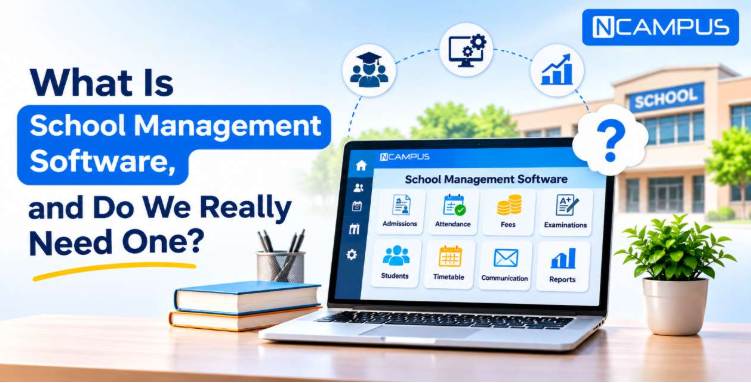
Running a school involves much more than teaching students. Every day,
schools manage admissions, attendance, fees, examinations, staff records, and parent
communication. These activities need proper coordination and accurate information.
Many
Indian schools still use registers, spreadsheets, and separate applications for daily tasks.
These methods may work for smaller institutions. However, managing information becomes
difficult as the school grows.
This is where school management software can help. But what is school management software?
How does it work? And does every school really need it?
This guide explains its features, benefits, costs, and practical uses. It will also help you
decide whether your school needs a digital management system.
Click here for School
Management Software Demo
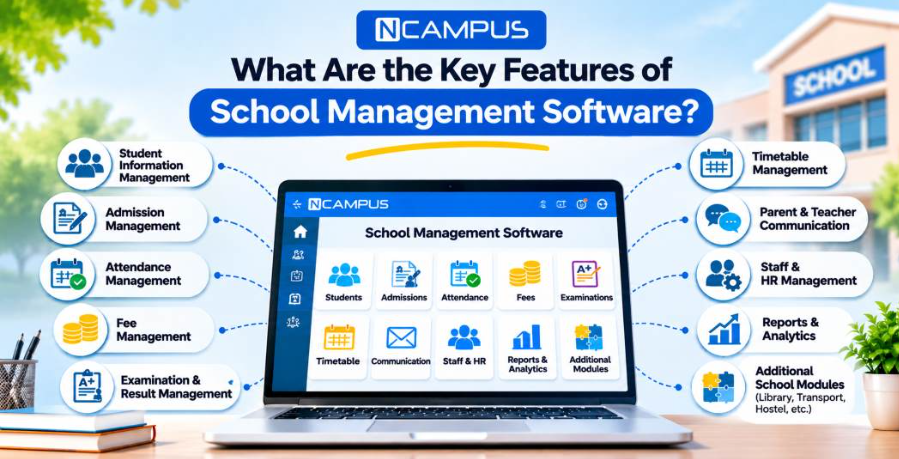
A school management system includes several features that support daily
school activities. The exact features depend on the software provider and selected modules.
Here are the most important ones.
1. Student Information Management
Every school maintains important student records. These include personal details, admission
information, class assignments, parent contacts, and academic history.
A student information management module stores these details digitally.
Authorised staff can find student information without searching through multiple registers.
Records
can also be updated when students change classes or their details need correction.
This helps schools maintain organised and accessible student information
2. Admission Management
The admission process involves enquiries, application forms, document verification, and student
registration.
Managing these activities manually can become difficult during admission season.
Admission management software helps schools organise applicant information and maintain
admission
records.
It can also reduce repetitive paperwork and make the admission process easier to monitor.
3. Attendance Management
Daily attendance is an important responsibility for every school.
Traditional attendance registers require teachers to record attendance manually. Preparing
monthly
reports may also take additional time.
Digital attendance management allows teachers to record student attendance through the system.
School administrators can review attendance information. Parents may also receive attendance
updates
when the platform supports this feature.
This helps schools identify attendance patterns and maintain accurate records.
4. Fee Management
Managing school fees involves several activities. These include recording payments, tracking
pending
fees, maintaining receipts, and preparing financial reports.
A fee management module helps the accounts department organise these tasks.
Depending on the software, schools may also offer online fee payments, digital receipts, fee
reminders, and payment reports.
This can be useful for Indian schools that manage tuition fees, transport charges, annual fees,
and
other payment categories.
5. Examination and Result Management
Schools conduct regular tests, assessments, and examinations.
Teachers need to record marks, calculate grades, and prepare student progress reports.
An examination management module helps organise these activities digitally.
It may support examination schedules, marks entry, grading, and report generation.
This makes academic record management more systematic.
6. Timetable Management
Preparing a school timetable requires proper coordination.
Schools must consider teachers, subjects, classes, and available periods.
A timetable management module helps organise class schedules and teacher assignments.
It can also make timetable updates easier when changes are required.
7. Parent and Teacher Communication
Good communication helps parents stay informed about their children's education.
Schools regularly share examination schedules, attendance updates, fee information, circulars,
and
important announcements.
School management software may provide mobile applications and communication tools for these
activities.
For example, parents can check available school updates through a mobile application instead of
contacting the school office for every enquiry.
NCampus provides dedicated school management applications for
teachers and parents. These applications help users access information relevant to their
responsibilities.
8. Staff and HR Management
Schools also need to manage teachers and non-teaching employees.
Staff records may include personal information, attendance, leave details, and
employment-related
information.
An HR management module helps organise these records.
Some systems also offer payroll and staff reporting features.
9. Reports and Analytics
School principals and administrators need accurate information to make decisions.
A reporting module helps them review attendance, admissions, fee collection, and academic
performance.
Instead of collecting reports from different departments, management can access available
information through the system.
This can improve administrative planning and monitoring.
10. Additional School Management Modules
Some schools need more than basic administration features.
Depending on their requirements, they may need library, transport, hostel, inventory,
accounting, or
e-learning facilities.
For example, a school providing transport services may need a transport management module. A
residential school may require hostel management.
NCampus offers different school ERP modules, including
administration,
operations, finance, faculty, and optional modules.
Schools can explore these modules to understand which functions match their requirements.
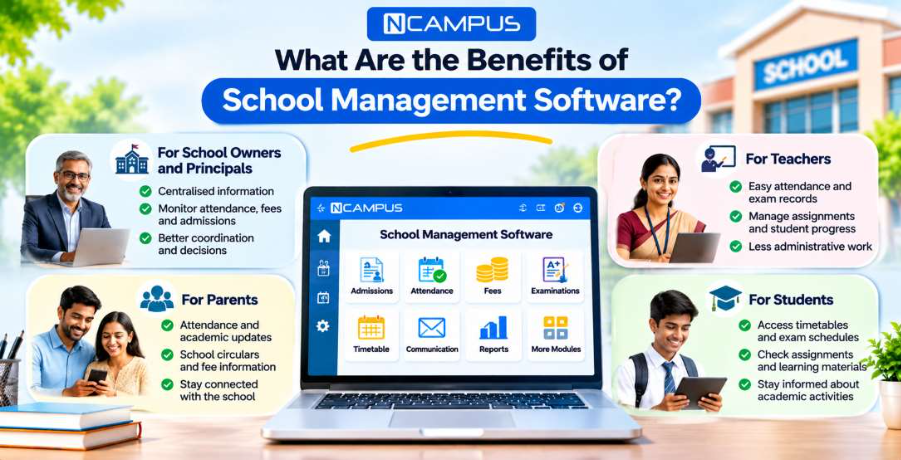
School management software can benefit the entire school community. Its main advantage is better
organisation of daily activities.
However, the benefits are different for school management, teachers, parents, and students.
Benefits for School Owners and Principals
School owners and principals need to monitor academic and administrative activities.
A centralised system can help them review important information without collecting separate
reports
from every department.
They can monitor available attendance records, fee reports, admissions, and academic
performance.
Modern school management software features may also include
dashboards
that help school leaders review operational information.
This supports better coordination and more informed decisions.
Benefits for Teachers
Teachers handle several responsibilities beyond classroom teaching.
They maintain attendance, prepare examination records, manage assignments, and update student
progress.
School management software provides digital tools for these activities.
This can reduce repetitive administrative work and help teachers spend more time on teaching.
Benefits for Parents
Parents want regular information about their children's education.
A parent application can provide access to attendance updates, academic progress, school
circulars,
and fee information.
This helps parents stay connected with the school.
It can also reduce unnecessary visits or calls for routine enquiries.
Benefits for Students
Students benefit when academic information is organised and easily available.
Depending on the platform, students may access timetables, examination schedules, assignments,
and
learning materials.
This helps them stay informed about academic activities.
Manual School Management vs Digital School Management
Many schools use registers and spreadsheets to manage daily operations.
These tools can be useful. However, they may become difficult to manage when student numbers and
administrative responsibilities increase.
Here is a simple comparison.
| Manual School Management |
Digital School Management |
| Records maintained in registers and files |
Records maintained digitally |
| Attendance summaries prepared manually |
Digital attendance records |
| Fee information stored in separate files |
Centralised fee records |
| Reports prepared by collecting information |
Reports generated from available system data |
| Communication through separate channels |
Connected communication tools |
| Searching old records may take time |
Authorised users can retrieve records more easily |
| Repeated data entry may be required |
Connected modules can reduce duplicate entries |
Digital systems also have requirements. Schools need staff training, proper
data
entry, and technical support.
Therefore, adopting software is only the first step. Schools must also use it correctly.
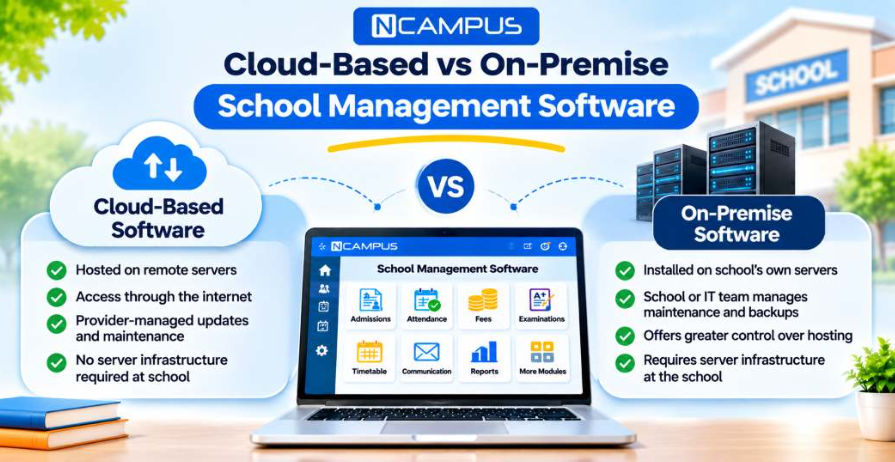
School management software is generally available through two deployment models: cloud-based and
on-premise.
Both can manage school operations, but they differ in hosting and maintenance.
Cloud-Based School Management Software
Cloud-based software is hosted on remote servers.
Authorised users access the platform through the internet.
Schools usually do not need to maintain their own application servers. The provider may also
manage
software updates, hosting, and technical maintenance.
This option can be practical for schools that do not have a dedicated IT infrastructure team.
On-Premise School Management Software
On-premise software is installed on servers managed by the school.
The institution is responsible for its infrastructure, maintenance, and backups, unless these
services are outsourced.
This model may suit schools that require greater direct control over their hosting environment.
| Feature |
Cloud-Based |
On-Premise |
| Hosting |
Remote servers |
School-managed servers |
| Access |
Internet-based |
Local or configured remote access |
| Maintenance |
Usually provider-managed |
School or IT team-managed |
| Server Infrastructure |
Usually not required at school |
Required |
| Updates |
Often provider-managed |
May require local installation |
| Internet Dependency |
Generally required |
Depends on system configuration |
The right choice depends on the school's budget, internet reliability, security
requirements, and technical resources.
School Management Software vs School ERP vs LMS vs SIS
Schools often come across different software terms while researching digital solutions.
These include School Management Software, School ERP, LMS, and SIS.
Although their features may overlap, they have different primary purposes.
School Management Software: Manages school administration and academic activities. These
include admissions, attendance, fees, examinations, and communication.
School ERP: Connects multiple school departments through an integrated system. It may
include
finance, HR, student management, examinations, and other operational modules.
Learning Management System (LMS):Focuses on teaching and learning. It helps manage
digital
lessons, assignments, learning materials, and online assessments.
Student Information System (SIS): Primarily manages student information. This includes
enrollment details, academic records, class information, and student history.
Some modern platforms combine features from these categories.
Therefore, schools should compare the actual features rather than relying only on the
software
name.
Does Every School Really Need School Management Software?
No. Every school does not need the same type of management software.
The requirement depends on the number of students, administrative workload, existing processes,
and
future plans.
A small school with limited administrative activities may manage its records using basic digital
tools.
However, as the school grows, maintaining information across multiple registers and spreadsheets
can
become difficult.
For example, consider a school that has recently expanded from 300 to 1,200 students.
The administration now handles more admissions, fee records, attendance reports, and parent
enquiries.
Managing these activities manually may require additional staff time.
A school management system can help organise these processes.
Schools should consider digital management software when they face repeated data entry,
difficulty
tracking fees, delayed reporting, or communication gaps.
The goal should not be to purchase the most expensive system. It should be to choose
software
that solves real administrative problems.
Is School Management Software Useful for Small Schools in India?
Yes. Small schools can benefit from school management software when it addresses their
actual needs.
A small institution may not require advanced HR, hostel, or transport management.
It may only need student records, attendance, fee management, and parent communication.
Starting with essential modules can make adoption easier.
Schools can add more features as their requirements grow.
This approach is useful for institutions that want to improve administration without
introducing
unnecessary complexity.
How Much Does School Management Software Cost in India?
The cost of school management software in India depends on several factors.
These include the number of students, selected modules, deployment model, customisation
requirements, and support services.
Some providers charge an annual subscription. Others may use per-student pricing or a customised
institutional package.
Schools should also consider additional costs such as implementation, staff training, data
migration, payment gateway charges, and optional modules.
A lower subscription price does not always mean a lower total cost.
Before selecting a provider, schools should request a clear quotation and understand what is
included.
They should also check renewal charges and any additional fees for future expansion.
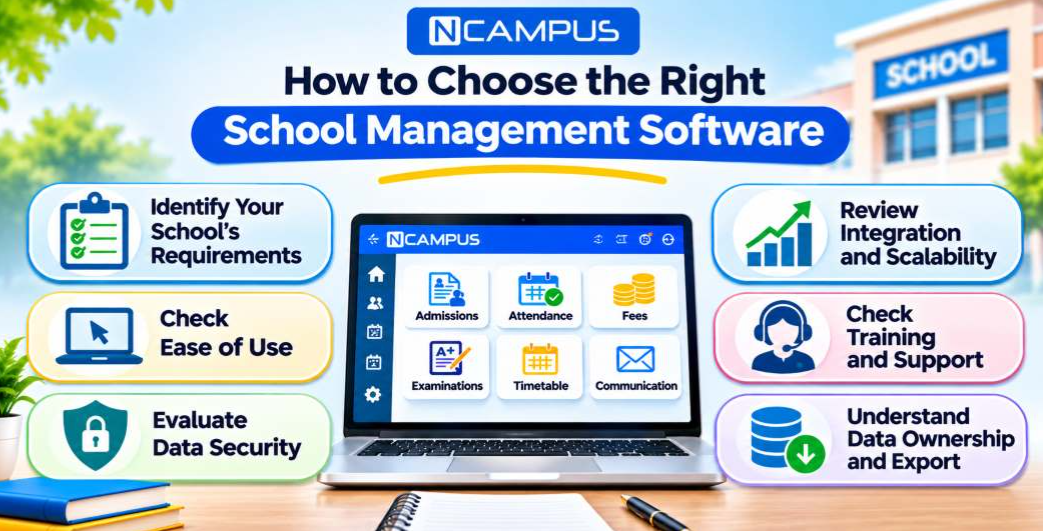
Choosing school management software requires careful evaluation.
Schools should focus on practical requirements rather than selecting a platform only because it
offers many features.
Identify Your School's Requirements
Start by reviewing the activities that take the most administrative time.
These may include admissions, attendance, fee collection, examination management, or parent
communication.
Prepare a list of essential features before contacting software providers.
Check Ease of Use
The software should be easy for teachers and administrative staff to understand.
A complicated system may create additional work instead of reducing it.
Ask for a demonstration and check how common tasks are performed.
Evaluate Data Security
Schools maintain sensitive student, parent, and employee information.
Before choosing software, review its access controls, hosting arrangements, backup procedures,
and
data protection practices.
Ask who can access the information and how user activity is monitored.
Review Integration and Scalability
A school may need additional modules as it grows.
Check whether the software can support more students, classes, departments, or campuses.
Also ask whether it can work with other systems already used by the school.
Check Training and Support
Staff training is important for successful implementation.
Schools should understand what onboarding assistance and technical support the provider offers.
Reliable support can help resolve issues during daily operations.
Understand Data Ownership and Export
Before purchasing software, ask how the school can access and export its records.
Check what happens to student and financial data if the institution changes providers.
This is important for long-term flexibility.
What Challenges Can Schools Face During Implementation?
Introducing school management software can improve administration, but the transition requires
planning.
One common challenge is staff adoption.
Teachers and administrative employees may be familiar with registers and spreadsheets. They may
need
training before becoming comfortable with a new system.
Another challenge is data migration.
Existing student records, fee information, and academic details must be reviewed before being
transferred.
Schools may also face internet connectivity issues, especially when using cloud-based
software.
A phased implementation can help address these challenges.
For example, a school may begin with student information and attendance management. It can
introduce
fee management and examination modules after staff become familiar with the platform.
Regular training and clear responsibilities can make the transition smoother.
How Can NCampus Help Schools Manage Daily Operations?
Indian schools often manage academic and administrative information across different
departments.
NCampus provides an integrated school management
platform
designed to connect these activities.
The platform includes modules for administration, operations, finance, and faculty management.
Schools can use its available features to manage student information, admissions, attendance,
fee
collection, examinations, assignments, and academic reports.
NCampus also provides applications for administrators, principals, teachers, and
parents.
These applications help authorised users access relevant information through
supported devices.
For institutions with additional requirements, NCampus offers optional modules such as
library,
transport, hostel, inventory, HR, e-learning, and accounting.
The platform also highlights
role-based access, cloud hosting, and audit logs as part of its approach to managing
institutional
information.
Its modular structure allows schools to evaluate different features according to their
requirements.
For schools planning to move from manual processes to digital administration, NCampus
offers
a way to explore how connected school operations can work in practice.
What Is the Future of School Management Software in India?
School management technology continues to develop as institutions look for more efficient ways
to
handle administrative work.
Cloud-based platforms, mobile applications, automated notifications, and digital reporting
are
becoming important areas of development.
Artificial intelligence may also support certain administrative activities in the future.
For example, AI-assisted tools may help schools analyse attendance patterns, organise
information,
or prepare reports.
However, AI features should not be confused with ordinary software automation. Their
accuracy,
privacy implications, and practical value must be evaluated carefully.
Schools should also pay attention to student data protection and responsible technology use.
The most useful systems will be those that solve everyday problems without making school
operations
unnecessarily complicated.
Final Thoughts: Do Schools Really Need Management Software?
School management software is not essential for every institution in exactly the same way.
A small school with simple administrative processes may manage its activities using basic
tools.
However, growing schools often face challenges with student records, attendance, fees,
examinations,
and communication.
A suitable digital system can help organise these activities and improve coordination between
departments.
The right decision depends on the school's needs, budget, staff readiness, and future plans.
Before choosing a platform, school leaders should identify their administrative
challenges
and evaluate the available options.
When implemented properly, school management software can become a valuable part of everyday
school
operations.
School management software is a digital tool that helps schools manage student
records,
admissions, attendance, fees, examinations, and communication. It brings important
school activities into one organised system.
It helps schools maintain accurate records, reduce repetitive administrative work,
organise information, and improve communication. It can also help management review
important academic and operational reports.
No. The need depends on the school's size and administrative requirements. Small
schools
may manage with basic tools, while growing institutions may benefit from a more
integrated system.
School management software is a broad term for tools that manage school activities.
School ERP usually refers to a more integrated system connecting departments such as
administration, finance, HR, and academics.
Yes. Small schools can start with essential modules such as student information,
attendance, fee management, and parent communication. They can add other features
when
required.
It helps teachers maintain attendance records, manage examination marks, organise
assignments, and review student progress. This can reduce some routine
administrative
tasks.
Yes. Many modern systems provide parent applications. These may allow parents to
check
attendance, academic updates, circulars, notifications, and fee information.
Cloud-based software can be secure when suitable protection measures are
implemented.
Schools should check access controls, hosting security, backup policies, and the
provider's data protection practices.
Pricing depends on the number of students, selected modules, deployment model, and
support requirements. Schools should request a detailed quotation that includes
setup,
subscription, training, and additional charges.
Important features include student information management, admissions, attendance,
fee
collection, examination management, reporting, and parent communication. Additional
features depend on the school's requirements.
Some platforms support multiple campuses through centralised administration and
campus-specific access. Schools should confirm this capability with the provider
before
purchasing.
Implementation time depends on the institution's size, selected modules, existing
data,
and training needs. Simple implementations may take a few weeks, while complex
projects
can require more time.
Yes. CBSE and ICSE schools can use management software for admissions, attendance,
fees,
examinations, and communication. Schools should verify that the platform supports
their
specific academic workflows.
If your school faces difficulties managing daily tasks manually, it may need ERP
software. It can simplify administration and save time.